

If you've ever tracked IP addresses in a spreadsheet, hunted through Confluence pages to find an available VLAN ID, or dealt with the aftermath of duplicate resource assignments, you already understand the problem Infrahub Resource Manager solves.
Infrahub Resource Manager in a nutshell
Infrahub Resource Manager automates the allocation of network resources from predefined pools, eliminating manual assignment and preventing conflicts across your infrastructure.
Instead of manually tracking which IP addresses, VLAN IDs, or BGP ASNs are available, you define pools of resources and let the Resource Manager handle allocation automatically.
When you need a loopback IP for a device or a /31 subnet for a point-to-point link, the Resource Manager instantly provides the next available resource, tracks the allocation, and ensures no other system can assign that same resource.
This eliminates tedious lookup work, prevents duplicate assignment mistakes, and provides complete visibility into what's allocated and what's available.
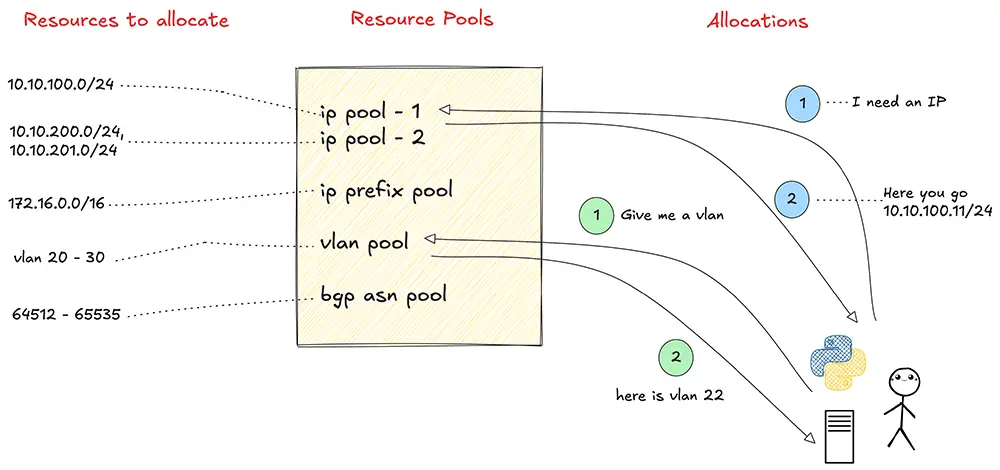
Infrahub Resource Manager is designed for automation from the ground up, making it perfect for modern infrastructure-as-code workflows. And because it's branch-agnostic, you can safely allocate resources in development branches knowing those allocations are immediately reserved across your entire system, preventing merge conflicts before they happen.
Resources you can manage with Infrahub Resource Manager
Infrahub Resource Manager handles three primary types of resource pools, each designed for specific infrastructure needs.
- IP address pools allocate individual IP addresses from defined IP prefixes. Perfect for device loopback interfaces, management IPs, or service endpoints.
- IP prefix pools allocate smaller subnets from larger parent prefixes. This is useful for carving up address space into smaller chunks, like allocating /31 point-to-point subnets from a /24 block, or providing customer allocations from your provider-assigned space.
- Number pools allocate sequential numeric identifiers from defined ranges. While network-specific uses like VLAN IDs or BGP AS numbers are obvious, Number Pools are remarkably flexible. You can use them to manage virtually any numeric identifier, such as circuit IDs, interface indices, or service contract numbers.
IPAM in Infrahub
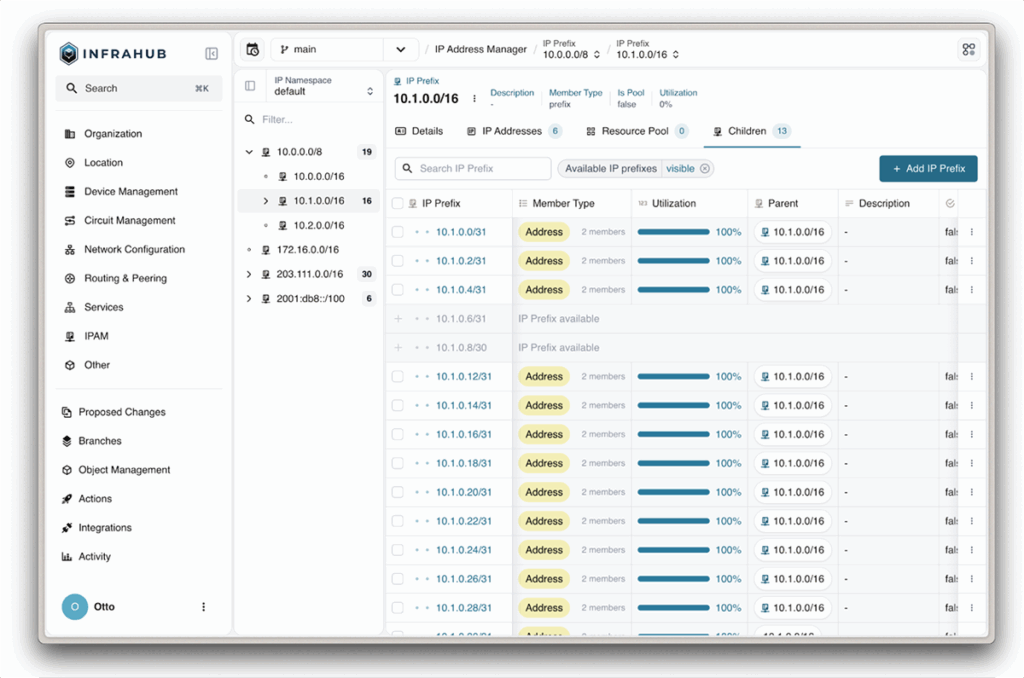
The IP address management module in Infrahub Resource Manager has all the capabilities you would expect for IPAM.
At the foundation are namespaces allowing you to maintain separate, potentially overlapping address spaces. For example, you might have "Production" and "Development" namespaces, each containing 10.0.0.0/8 space without conflict.
Within namespaces, Infrahub manages IP prefixes in a hierarchical structure. The system automatically understands relationships between parent and child prefixes—that 10.1.1.0/24 is contained within 10.1.0.0/16, for instance.
You can define the member type for any prefix (prefix or address), and Infrahub uses this to compute utilization appropriately, tracking allocated addresses for address-type prefixes and child prefix allocations for prefix-type prefixes. This provides accurate visibility into capacity at every level of your addressing hierarchy.
How is Infrahub Resource Manager different from IPAM tools?
Traditional IPAM tools focus primarily on tracking IP address space. They’re essentially sophisticated databases for recording which IPs are allocated.
Infrahub Resource Manager can manage IP addresses and IP prefixes but many other resources as well, including VLAN IDs and BGP ASNs. In fact, the Resource Manager can manage virtually any sequentially numbered resource you want to track. The same allocation mechanisms, visibility tools, and automation patterns work regardless of resource type.
The Resource Manager is designed for automation and can be called by workflows, Infrahub Generators, and CI/CD pipelines. Its idempotent allocation behavior means automation can safely request resources without creating duplicates when code runs multiple times.
The integration with Infrahub's branching model is another key differentiator. Resource allocations are branch-agnostic. A resource allocated in any branch is immediately reserved across all branches, preventing duplicate allocations that would cause merge conflicts. Traditional IPAM tools have no concept of this workflow.
Common use cases for Infrahub Resource Manager
- Device provisioning workflows can automatically assign loopback IPs, management IPs, and router IDs from appropriate pools during device creation, eliminating manual lookup and ensuring consistency.
- Data center expansion and point-to-point link creation benefit from automatic prefix allocation. As you add switches or routers needing /31 links, the Resource Manager allocates the next available subnet, ensuring no overlaps.
- Customer or tenant onboarding in service provider environments is streamlined by automatically allocating IP prefixes and BGP AS numbers during onboarding workflows.
- VLAN management across campus or data center networks ensures unique VLAN allocation and prevents conflicts, especially valuable when different teams manage different network parts.
How Infrahub Resource Manager works
The Resource Manager operates on a straightforward principle: You create pools that reference source resources, then request allocations either directly or during infrastructure object creation.
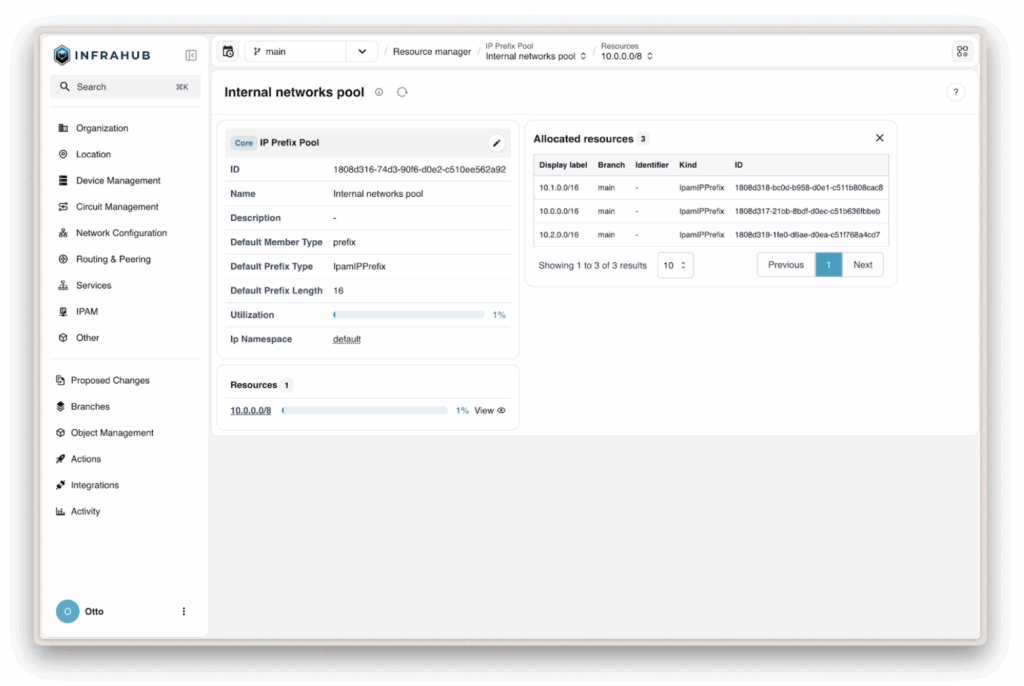
For IP address and IP prefix Pools, you attach one or more prefixes as the source resources from which allocations will be drawn. When creating an IP prefix pool, you also set a Default Prefix Length, which determines the size of subnets that will be allocated from the pool (like /31 for point-to-point links or /24 for site networks). This default can be overridden on a case by case basis if you need a different size for specific allocations.
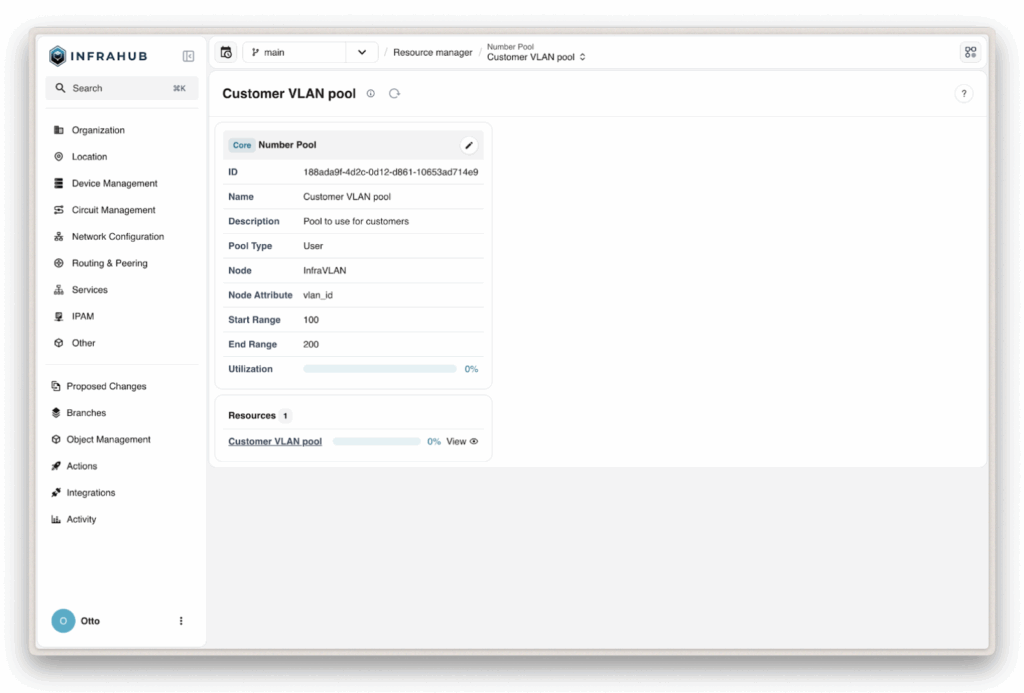
For a number pool, you define the available range (like 100-200), then the pool is bound to a node’s attribute (e.g., VLAN > VLAN ID).
Allocation happens through two methods:
- Direct allocation creates standalone resource objects from a pool, which is useful for pre-provisioning resources or building inventories.
- Relationship resource allocation happens during infrastructure object creation. When creating a router, for example, you request its loopback IP through a relationship to a pool, and the Resource Manager allocates and establishes the relationship atomically.
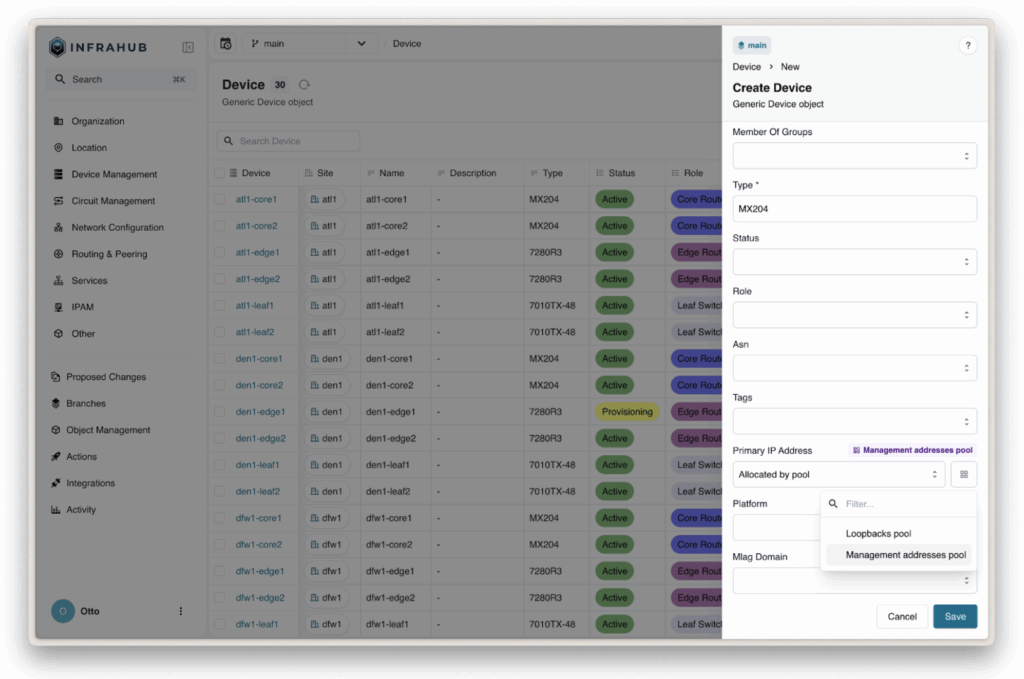
You can request allocations through the Infrahub GUI, the Python SDK with methods like allocate_next_ip_address(), or GraphQL with mutations like IPAddressPoolGetResource. The Resource Manager identifies the next available resource, marks it as allocated, and records metadata including which branch allocated it and any identifier you provided.
How Resource Manager works with Infrahub's schema system
The Resource Manager is built on Infrahub’s schema system, which means it inherits the full flexibility provided by schemas. The core pool types—CoreIPAddressPool, CoreIPPrefixPool, and CoreNumberPool—are defined in Infrahub’s schema just like any other object type.
An Automation Engineer’s Guide to Understanding Data Schemas
Because pools are first-class schema objects, you can create relationships from any node to a pool. For example, you can link a Site node to an IP prefix pool to explicitly document which pool should be consumed for that site. This creates an explicit association that eliminates the need to rely on parsing names or descriptions.
These relationships can be used by your automation logic to determine which pool to draw from when provisioning new resources for a given site.
Understanding idempotent allocation
Idempotency means performing an operation multiple times produces the same result as performing it once. In the Resource Manager, idempotent allocation means requesting a resource with the same identifier multiple times returns the same resource rather than creating duplicates.
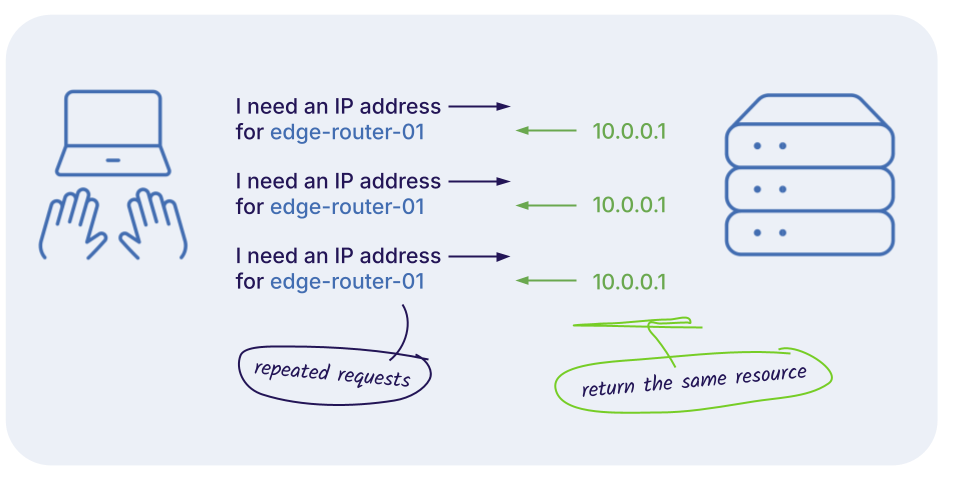
Idempotent allocation is critical for automation. Consider a script that provisions a router and allocates a loopback IP. If the script runs but your deployment system retries it due to a timeout, you don't want a second IP—you want the same one already allocated.
The Resource Manager provides idempotency through the identifier parameter. When you request an allocation, you can include an identifier, a string that uniquely represents the allocation's purpose. For example, when allocating a loopback IP for router edge-01, you could use identifier edge-01-loopback. If the Resource Manager finds an existing allocation with that identifier, it returns it. Otherwise, it allocates a new resource and records the identifier.
In this way, your automation can be truly declarative, dramatically simplifying automation and testing.
Using weighted allocation
Weighted allocation gives you control over the order in which the Resource Manager draws resources from a pool. Each source can have an allocation_weight attribute. The Resource Manager allocates from higher-weighted sources first, exhausting them before moving to lower-weighted ones.
Let’s say you have an IP address pool drawing from 10.100.0.0/24 and want to transition to 192.168.200.0/24. Rather than abruptly cutting over, you add the new prefix to your pool but give the old prefix a higher allocation weight (say, 10) and the new prefix a lower weight (say, 5).
The Resource Manager continues allocating from the old prefix until it's exhausted, then automatically starts allocating from the new prefix. This provides a gradual, automatic migration without needing to change any of your allocation logic or create and swap between different pools.
Weighted allocation is also valuable for capacity planning and staged rollouts. If you're anticipating growth and want to preserve address space in a particular block for future use, you can add that block to your pool with a lower weight. The Resource Manager won't use it until your higher-weighted blocks are exhausted, effectively reserving that space while still making it available as a safety net if needed.
Infrahub Resource Manager is branch-agnostic
One of the Resource Manager's most powerful features is its branch-agnostic allocation, which solves resource allocation conflicts during merges.
As an example, let’s say two engineers are working in separate branches, and both are allocating loopback IPs from the same pool. In typical systems, each branch allocates the resources independently, potentially assigning the same IP to different routers. When branches merge, you have duplicate IPs, which are often discovered only after deployment.
The Resource Manager prevents this entirely. When a resource is allocated in any branch, that allocation is immediately visible and reserved across all branches. If one engineer allocates 192.0.2.1, the other cannot—they get 192.0.2.2 instead. When branches merge, there are no conflicts because resources were never duplicated.
Integrating Infrahub Resource Manager into your automation workflows
Infrahub Resource Manager is designed to be a first-class component of infrastructure automation, with multiple integration points that fit different automation scenarios.
The Resource Manager can be accessed through the Python SDK and GraphQL API, making it the foundation for various automation integrations:
- The Python SDK provides intuitive methods like
allocate_next_ip_address()that handle GraphQL complexity behind the scenes, making it easy to integrate allocation into Python-based automation tools. - The GraphQL API offers maximum flexibility for custom automation or non-Python tools. Mutations like
IPAddressPoolGetResourceprovide direct access to allocation functionality from any language or tool.
Using these two entry points, you can integrate the Resource Manager into:
- Infrahub Generators that automatically allocate resources during execution and incorporate them into generated configurations.
- CI/CD pipelines that allocate resources as part of infrastructure deployment workflows—for example, allocating IP addresses or VLAN IDs before provisioning new services.
- Ansible playbooks, Terraform modules, or custom scripts that need to request and track infrastructure resources programmatically.
Infrahub Resource Manager FAQs
How can I see what resources are in use and what's available in Infrahub?
What happens when a pool runs out of resources?
Can I manually override or reserve specific resources within a pool?
Can I release or reclaim allocated resources?
What happens to allocations when I delete or merge a branch?
Can I exclude certain addresses from automatic allocation?
Can multiple pools allocate from the same parent resource?
How do I handle multi-site or multi-region resource allocation?
Can I use Infrahub Resource Manager with custom object types?
Can I see allocation history or audit trails for compliance?
How do I migrate existing resources into the Resource Manager?
What are the limitations or constraints of Infrahub Resource Manager I should know about?

Ready to try Infrahub Resource Manager?
- Follow a hands-on tutorial: Our technical deep dive on the Resource Manager walks you through implementing automated resource allocation step-by-step, with real code examples and complete workflows.
- Implement the Resource Manager in your environment: The Resource Manager implementation guide in our documentation provides everything you need to set up pools, configure allocation, and integrate with your automation.
- See it in action: Play in the sandbox or request a personalized demo to see how the Resource Manager can eliminate resource conflicts and streamline allocation in your specific infrastructure environment.