


A few months ago, I gave a presentation at AutoCon 1 on How a Network Source of Truth Transformed Customer Provisioning and Team Dynamics. The talk covered how a clear service definition and some automation enabled us to deliver consistent customer services. I also highlighted the added value it provided by optimizing resource utilization and enforcing the service lifecycle.
At the time, the implementation was functioning well, and the project was considered a success. However, we already had concerns about its long-term viability. The form provided to end users was too tightly coupled to the underlying implementation and lacked flexibility. Additionally, the rigid data model required substantial effort to support complex use cases and evolving business needs.
Since then, many things have changed. Today, I’d like to revisit this challenge, but with a completely different technical stack.
In this post, I’ll explore the theoretical aspects of the approach and provide a link to the repository containing the corresponding implementation. In addition, you can watch the video walk through.
Problem statement
Organizations aim to deliver services effectively, as this is where the money flows.
However, implementing a service catalog is a complex operation that many organizations struggle with. It demands a deep understanding of the product lifecycle, the interplay of various components, and coordination among numerous stakeholders. Beyond that, it requires a robust technical implementation to automate all the associated rules and processes properly.
The stakes are high because the structure of a service dictates everything downstream—from invoicing and lifecycle management to resource allocation and capacity planning. A poorly designed service layer can result in inefficiencies and challenges at every stage.
Example use case

Let’s consider a fictional ISP, Otter-net, which provides standard internet connectivity. To maintain clarity, I’ll deliberately skip low-level technical details and focus on generic aspects that might resonate with other use cases.

Otter-net operates multiple points of presence across Europe. Currently, it offers a single service: dedicated internet access. This service provides customers with a physical port and a set of public IP addresses for hosting services. Additional services are planned for the future!

The operational team at Otter-net is divided into two groups:
- Network Architects: Experts with extensive networking experience, responsible for operating and maintaining the backbone network.
- Service Delivery Team: Customer-facing professionals responsible for provisioning and connecting services to the backbone.
It all starts with data
To structure and store the data, we’ll use Infrahub, which offers a flexible schema—a feature that lets you design a data model tailored to your specific needs. By default, Infrahub doesn’t include any prebuilt schemas; it’s up to you to create and load them.
Fortunately, the Infrahub Marketplace provides various examples and schema shards to help you quickly scaffold a usable schema. The base schema is mandatory, as it provides foundational generics required for all extensions. From there, you can pick additional modules. In our case, we selected:
- Location Minimal: Defines a hierarchical tree for country, metro, and site.
- VLAN: Includes nodes for VLANs and L2 domains.
In the future, we may need modules like circuits, cross-connects, or routing. These can be copied into the local repository and customized to perfectly suit our needs.
Now comes the core challenge: crafting a fully custom schema for our service object.
As mentioned earlier, Otter-net is planning to offer multiple services in the future. To enable these future expansions, I created a generic service object. This object holds all common attributes shared across the products. Additionally, we’ll use this generic structure to simplify relationships, which we’ll revisit later.
Next, I developed a DedicatedInternet schema node that inherits from the generic service object and includes a few additional attributes. These attributes are relatively high-level (e.g., an ip_package with T-shirt size values) and are primarily intended as inputs for users.
By default, Infrahub creates data within branches (parallel realities), but it also supports branch-agnostic objects. A branch-agnostic object is propagated to all branches, regardless of where it was created. Here, branch-agnostic behavior is applied in the schema to the service object and key attributes, such as service_identifier. This ensures consistent tracking of a service across all ongoing implementations and branches.
To capture all the building blocks of my service (such as prefixes, interfaces, etc.), I implemented various relationships. These relationships include some advanced behaviors. For instance, consider the relationship between sites and services. From a site’s perspective, I only need a list of services and don’t want multiple relationships for each type of service. However, for a specific type of service, I want to enforce rules within the relationships. For example, a distributed service could link to multiple sites, whereas a DedicatedInternet service is tied to a single site.
While these requirements might seem contradictory, the Infrahub schema effectively supports such advanced use cases. By configuring directions in relationships to point toward the generic service from a site’s perspective and initiating the relationship in the node pointing toward the site, we achieve the desired behavior. Using the same identifier in the relationship allows Infrahub to recognize it as a single, unified relationship.
---
# yaml-language-server: $schema=https://schema.infrahub.app/infrahub/schema/latest.json
version: "1.0"

generics:
  - name: Generic
    namespace: Service
    description: Generic service...
    label: Service
    icon: mdi:package-variant
    include_in_menu: true
    human_friendly_id:
      - service_identifier__value
    order_by:
      - service_identifier__value
    display_labels:
      - service_identifier__value
    attributes:
      - name: service_identifier
        kind: Text
        unique: true
        order_weight: 1000
        optional: false
        branch: agnostic
      - name: account_reference
        kind: Text
        order_weight: 1010
        optional: false
        branch: agnostic

nodes:
  - name: DedicatedInternet
    namespace: Service
    description: This service provides customers with a dedicated physical port, ensuring complete internet connectivity.
    label: Dedicated Internet
    icon: mdi:ethernet
    menu_placement: ServiceGeneric
    inherit_from:
      - ServiceGeneric
    include_in_menu: true
    branch: agnostic
    attributes:
      - name: status
        kind: Dropdown
        optional: false
        default_value: draft
        order_weight: 1050
        # Putting this one as branch aware otherwise generator put it as active in the branch and so on main as well
        # even tho the service is really active only when the branch is merged...
        branch: aware
        choices:
          - name: draft
            label: Draft
            color: "#D3D3D3"
          - name: in-delivery
            label: In Delivery
            color: "#A8E6A2"
          - name: active
            label: Active
            color: "#66CC66"
          - name: in-decomissioning
            label: In Decomissioning
            color: "#FFAB59"
          - name: decomissioned
            label: Decomissioned
            color: "#FF6B6B"
      - name: bandwidth
        kind: Dropdown
        optional: false
        order_weight: 1100
        branch: aware
        choices:
          - name: "100"
            label: Hundred Megabits
            description: Provides a 100 Mbps bandwidth.
          - name: "1000"
            label: One Gigabit
            description: Provides a 1 Gbps bandwidth.
          - name: "10000"
            label: Ten Gigabits
            description: Provides a 10 Gbps bandwidth.
      - name: ip_package
        kind: Dropdown
        optional: false
        order_weight: 1120
        branch: aware
        choices:
          - name: small
            label: Small
            description: Provide customer with 6 IPs.
            color: "#6a5acd"
          - name: medium
            label: Medium
            description: Provide customer with 14 IPs.
            color: "#9090de"
          - name: large
            label: Large
            description: Provide customer with 30 IPs.
            color: "#ffa07a"
    relationships:
      - name: location
        peer: LocationSite
        order_weight: 1150
        cardinality: one
        direction: inbound
        identifier: service_site
        optional: false
        branch: agnostic
      - name: dedicated_interfaces
        peer: DcimInterface
        kind: Attribute
        order_weight: 1200
        cardinality: many
        direction: inbound
        identifier: service_interface
      - name: vlan
        peer: IpamVLAN
        kind: Attribute
        order_weight: 1300
        cardinality: one
        direction: inbound
        identifier: service_vlan
      - name: gateway_ip_address
        peer: IpamIPAddress
        order_weight: 1350
        cardinality: one
        direction: inbound
        identifier: service_ip_address
      - name: prefix
        peer: IpamPrefix
        kind: Attribute
        order_weight: 1400
        cardinality: one
        direction: inbound
        identifier: service_prefix

extensions:
  nodes:
    - kind: LocationSite
      relationships:
        - name: services
          peer: ServiceGeneric
          cardinality: many
          direction: outbound
          identifier: service_site
          branch: agnostic
    - kind: DcimInterface
      relationships:
        - name: service
          peer: ServiceGeneric
          cardinality: one
          direction: outbound
          identifier: service_interface
    - kind: IpamVLAN
      relationships:
        - name: service
          peer: ServiceGeneric
          cardinality: one
          direction: outbound
          identifier: service_vlan
    - kind: IpamIPAddress
      relationships:
        - name: service
          peer: ServiceGeneric
          cardinality: one
          direction: outbound
          identifier: service_ip_address
    - kind: IpamPrefix
      relationships:
        - name: service
          peer: ServiceGeneric
          cardinality: one
          direction: outbound
          identifier: service_prefix
    - kind: CoreProposedChange
      relationships:
        - name: tags
          peer: BuiltinTag
          cardinality: many
During the schema development process, it’s helpful to use infrahubctl to check and load the schema in a branch, making adjustments as needed. In a production context, we’ll use Infrahub’s Git integration to load the schema in a controlled manner.
We now have the data model and data to support our business. It captures everything from services to the backbone, with some abstraction for flexibility. This setup is a strong foundation for automation.
… then capture the business logic …
Let’s now look at how to codify the business rules for service provisioning using Infrahub Generators. To put it simply, a Generator is a Python script that interacts with data to transform a high-level service request into a technical implementation. The process starts with defining inputs and mapping them to the final output.
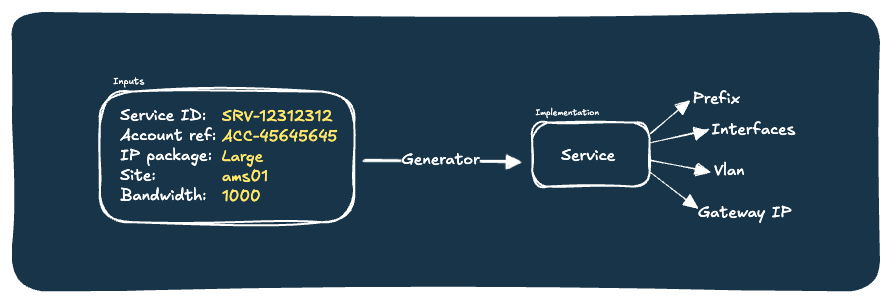
Generators are built on the concept of idempotency. If you’re familiar with Ansible, this concept should sound familiar. The goal is to make the Generator repeatable: it assigns resources the first time it runs, and if run again, it changes nothing if the desired state is already achieved. This approach ensures the code is robust and predictable.
Another convenient feature is Infrahub Resource Manager. It allows users to create pools and allocate resources from them, such as prefixes, IP addresses, or even numbers. We’ll use this feature to allocate our prefixes in a branch-agnostic and idempotent way. Additionally, we’ll use a number pool for VLAN IDs. This can seamlessly integrate with the Generator.
import logging
import random

from infrahub_sdk.generator import InfrahubGenerator
from infrahub_sdk.node import InfrahubNode
from infrahub_sdk.protocols import CoreIPPrefixPool, CoreNumberPool

ACTIVE_STATUS = "active"
SERVICE_VLAN_POOL: str = "Customer vlan pool"
SERVICE_PREFIX_POOL: str = "Customer prefixes pool"

IP_PACKAGE_TO_PREFIX_SIZE: dict[str, int] = {"small": 29, "medium": 28, "large": 27}


class DedicatedInternetGenerator(InfrahubGenerator):
    customer_service = None
    log = logging.getLogger("infrahub.tasks")

    async def generate(self, data: dict) -> None:
        service_dict: dict = data["ServiceDedicatedInternet"]["edges"][0]["node"]

        # Translate the dict to proper object
        self.customer_service = await InfrahubNode.from_graphql(
            client=self.client, data=service_dict, branch=self.branch
        )

        # Move the service as active
        # TODO: Not happy with ahving this one here...
        self.customer_service.status.value = "active"
        await self.customer_service.save(allow_upsert=True)

        # Allocate the VLAN to the service
        await self.allocate_vlan()

        # Translate teeshirt size to int
        self.prefix_length: int = IP_PACKAGE_TO_PREFIX_SIZE[
            self.customer_service.ip_package.value
        ]

        # Allocate the prefix to the service
        await self.allocate_prefix()

        # Allocate port
        await self.allocate_port()

        # Create L3 interface for gateway
        await self.allocate_gateway()

    async def allocate_vlan(self) -> None:
        """Create a VLAN with ID coming from the pool provided and assign this VLAN to the service."""

        self.log.info("Allocating VLAN to this service...")

        # Get resource pool
        resource_pool = await self.client.get(
            kind=CoreNumberPool,
            name__value=SERVICE_VLAN_POOL,
        )

        # Craft and save the vlan
        self.allocated_vlan = await self.client.create(
            kind="IpamVLAN",
            name=f"vlan__{self.customer_service.service_identifier.value}",
            vlan_id=resource_pool,  # Here we get the vlan ID from the pool
            description=f"VLAN allocated to service {self.customer_service.service_identifier.value}",
            status=ACTIVE_STATUS,
            role="customer",
            l2domain=["default"],
            service=self.customer_service,
        )

        # And save it to Infrahub
        await self.allocated_vlan.save(allow_upsert=True)

        self.log.info(f"VLAN `{self.allocated_vlan.display_label}` assigned!")

    async def allocate_prefix(self) -> None:
        """Allocate a prefix coming from a resource pool to the service."""

        self.log.info("Allocating prefix from pool...")

        # Get resource pool
        resource_pool = await self.client.get(
            kind=CoreIPPrefixPool,
            name__value=SERVICE_PREFIX_POOL,
        )

        # Craft the data dict for prefix
        prefix_data: dict = {
            "status": "active",
            "description": f"Prefix allocated to service {self.customer_service.service_identifier.value}",
            "service": [self.customer_service.id],
            "role": "customer",
            "vlan": [self.allocated_vlan.id],
        }

        # Create resource from the pool
        self.allocated_prefix = await self.client.allocate_next_ip_prefix(
            resource_pool,
            data=prefix_data,
            prefix_length=self.prefix_length,
            identifier=self.customer_service.service_identifier.value,
        )

        self.log.info(f"Prefix `{self.allocated_prefix}` assigned!")

        await self.allocated_prefix.save(allow_upsert=True)

    async def allocate_port(self) -> None:
        """Allocate a port to the service."""
        allocated_port = None

        self.log.info("Allocating port to this service...")

        # Fetch interfaces records
        await self.customer_service.dedicated_interfaces.fetch()
        self.log.info(
            f"There are {len(self.customer_service.dedicated_interfaces.peers)} interfaces attached to this service."
        )

        # If we have any interface attached to the service
        if len(self.customer_service.dedicated_interfaces.peers) > 0:
            # Loop over interfaces attached to the service
            for interface in self.customer_service.dedicated_interfaces.peers:
                # Get device related to the interface
                await interface.peer.device.fetch()
                # If the device is "core"
                if interface.peer.device.peer.role.value == "core":
                    self.log.info(
                        f"Found {interface.peer.display_label} already allocated to the service."
                    )
                    # Big assomption but we assume port is already allocated
                    self.index = interface.peer.device.peer.index.value
                    allocated_port = interface
                    break

        # If we don't have yet a port, we need to find one
        if allocated_port is None:
            self.log.info("Haven't found any port allocated to this service.")

            # Here, we pick randomly. In a real-life scenario, we might want to give this more thought
            self.index = random.randint(1, 2)

            # Find the switch on the site
            switch = await self.client.get(
                kind="DcimDevice",
                location__ids=[self.customer_service.location.id],
                role__value="core",
                index__value=self.index,
            )
            self.log.info(f"Looking for an interface on {switch}...")

            # Fetch switch interface data
            await switch.interfaces.fetch()

            # Find first interface on that switch that is free
            selected_interface = next(
                (
                    interface
                    for interface in switch.interfaces.peers
                    if interface.peer.role.value == "customer"
                    and interface.peer.status.value == "free"
                    and interface.peer.service.id is None
                ),
                None,  # Default value if no match is found
            )

            # If we don't have any interface available
            if selected_interface is None:
                msg: str = (
                    f"There is no physical port to allocate to customer on {switch}"
                )
                self.log.exception(msg)
                raise Exception(msg)
            else:
                self.log.info(
                    f"Found port {selected_interface.peer.display_label} to allocate to the service."
                )
                allocated_port = selected_interface

        allocated_port = allocated_port.peer

        # Enforce all params of this interface
        allocated_port.enabled.value = True
        allocated_port.status.value = "active"
        allocated_port.l2_mode.value = "Access"
        allocated_port.role.value = "customer"
        allocated_port.description.value = f"Port allocated to service {self.customer_service.service_identifier.value}"
        allocated_port.speed.value = int(self.customer_service.bandwidth.value)
        allocated_port.service = self.customer_service
        allocated_port.untagged_vlan = self.allocated_vlan

        # Finally save
        await allocated_port.save(allow_upsert=True)

    async def allocate_gateway(self) -> None:
        """Allocate a gateway to the service."""

        self.log.info("Allocating gateway to this service...")

        # Find the corresponding router
        router = await self.client.get(
            kind="DcimDevice",
            location__ids=[self.customer_service.location.id],
            role__value="edge",
            index__value=self.index,
        )

        # Work around issue
        if isinstance(self.allocated_vlan.vlan_id.value, int):
            vlan_id: int = self.allocated_vlan.vlan_id.value
        else:
            vlan_id: int = self.allocated_vlan.vlan_id.value["value"]

        # Create interface
        gateway_interface = await self.client.create(
            kind="DcimInterfaceL3",
            name=f"vlan_{str(vlan_id)}",
            speed=1000,
            device=router,
            status="active",
            role="customer",
            description=f"Gateway interface for service {self.customer_service.service_identifier.value}",
            enabled=True,
            service=self.customer_service,
            untagged_vlan=self.allocated_vlan,
        )
        await gateway_interface.save(allow_upsert=True)

        # Compute the gateway ip
        address: str = f"{str(next(self.allocated_prefix.prefix.value.hosts()))}/{str(self.prefix_length)}"

        # Create IP object
        self.gateway_ip = await self.client.create(
            kind="IpamIPAddress",
            address=address,
            service=self.customer_service,
            interface=gateway_interface,
        )
        await self.gateway_ip.save(allow_upsert=True)

        self.log.info(f"Gateway `{self.gateway_ip.address.value}` assigned!")

        # Add gateway to prefix
        self.allocated_prefix.gateway = self.gateway_ip

        # Save prefix
        await self.allocated_prefix.save(allow_upsert=True)
This Generator is closely tied to a GraphQL query that Infrahub executes and provides as input to the generate method. This connection is configured in a special file at the root of our repository called .infrahub.yml. Additionally, we need to specify a target, which is a group containing all the objects we want to automate—in this case, customer services. Once set up, we can test our generator using infrahubctl and verify that the output meets our expectations.
# yaml-language-server: $schema=https://schema.infrahub.app/python-sdk/repository-config/latest.json
---
# GENERATORS
generator_definitions:
  - name: dedicated_internet_generator
    file_path: "generators/implement_dedicated_internet.py"
    targets: automated_dedicated_internet
    query: dedicated-internet-info
    class_name: DedicatedInternetGenerator
    parameters:
      service_identifier: "service_identifier__value"

# QUERIES
queries:
  - name: dedicated-internet-info
    file_path: "generators/dedicated_internet.gql"

# SCHEMAS
schemas:
  - schemas/base
  - schemas/location_minimal
  - schemas/vlan
  - schemas/service
At this stage, we have a Generator that transforms a high-level service request into a complete service, sourcing resources from predefined pools with consistency and in just seconds.
… and give it to users as a service
The Generator we developed earlier is powerful but requires technical knowledge of low-level implementation, multiple operations, and access to Infrahub. To simplify the process for users, we’ll create a form on top of the Generator. This form will expose only the necessary inputs, create objects in a branch, and generate a Proposed Change for review by a network architect. We will implement this using Streamlit, a Python library that enables the creation of frontend applications without prior frontend experience.

The application will have two main pages: the form and the list of requests. The form provides a streamlined interface with only the relevant inputs, allowing users to request a new service in a controlled manner. It creates a “request” (a Proposed Change in Infrahub), which can be monitored on the second page. A network architect will review the request in Infrahub and approve it. Once approved, service delivery teams can view the allocated resources on the page and communicate them to the customer.

This form separates design from implementation. Users can request and interact with resources without dealing with low-level complexity. Additionally, we use Infrahub’s branching capabilities to push all changes to a dedicated branch, enabling architects to review exact modifications. Finally, the Proposed Change provides a runtime for the Generator and offers future possibilities, such as user-defined checks and artifacts for device configuration.
Conclusion
The flexible schema feature of Infrahub is an ideal solution for capturing the service layer as closely to the data as possible. It enables you to represent every building block of your current services while also scaling to accommodate the growth of your business, such as the addition of new products.
Additionally, the Generator feature provides a robust mechanism to codify your business rules, transforming service requests into proper implementations in an efficient manner.
Finally, encapsulating this logic into a form allows users to interact with data and resources more effectively, ensuring a clear separation of concerns.
Implementing this example as a production-ready product would require careful consideration of the overall BSS process. For instance, service objects likely exist prior to implementation (in a CRM system, for example) and would need to be synchronized with Infrahub. While creating a form is one option, it’s also possible that a system already present in your IT landscape (such as ticketing or CRM software) could fulfill this interface role.
Flexibility in the data model is crucial when it comes to the service layer. Since every organization operates slightly differently, there’s no one-size-fits-all solution. Your source of truth must adapt to your business, capturing existing and future products as well as all their various building blocks.
The quality of the data model, combined with the ease of interacting with the data it contains, will have a profound impact on downstream processes like service automation and resource management. Aligning a tailored data model, robust automation, and an efficient user interface will transform your source of truth into a powerful IT service catalog.

