

Infrahub 1.6 focuses on improving the day-to-day experience for teams managing infrastructure data and automation at scale. It makes common tasks easier to complete, navigation clearer, and system state easier to understand at a glance.
As Infrahub environments grow in size and complexity, small usability gaps can add friction to everyday work. The updates in this release are aimed at reducing that friction by refining how you explore large data sets, work with Git-backed workflows, and stay oriented as changes move through the system.
New dashboard landing page for system visibility
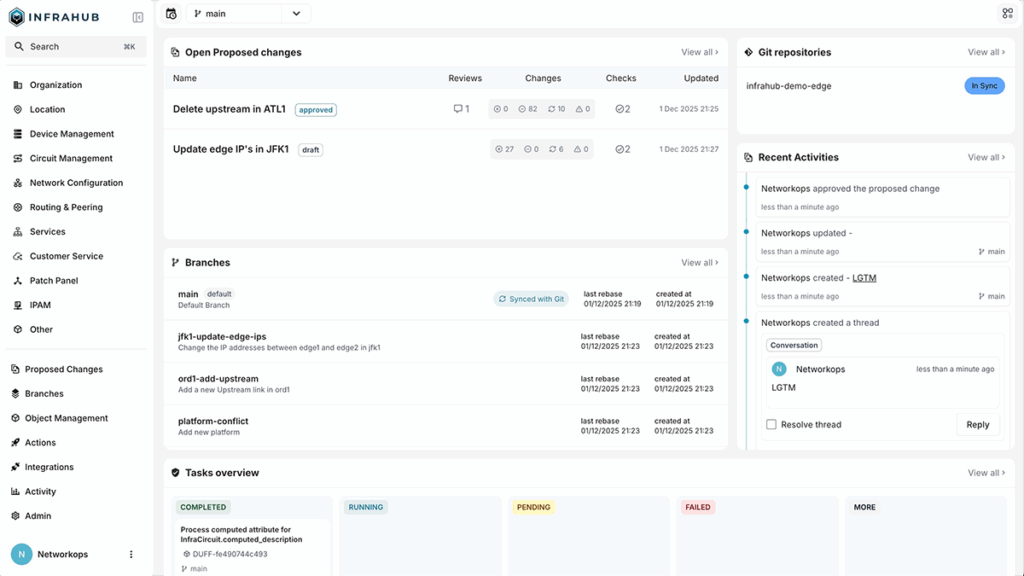
A new dashboard landing page gives you immediate visibility into what’s happening in your Infrahub environment. Instead of navigating across multiple views to check status, you now start on a single page that summarizes what needs attention.
The dashboard surfaces:
- Open Proposed Changes and their current review status
- Git repository synchronization status
- Recent branches and activity
- Task overview, including running, completed, and failed tasks
- Getting started resources for new users
The dashboard gives you a clear starting point each time you log in. Whether you’re reviewing changes, checking sync health, or looking for failed background tasks, you can quickly understand the current state of the system and decide where to focus next.
Navigating large hierarchical data with better context
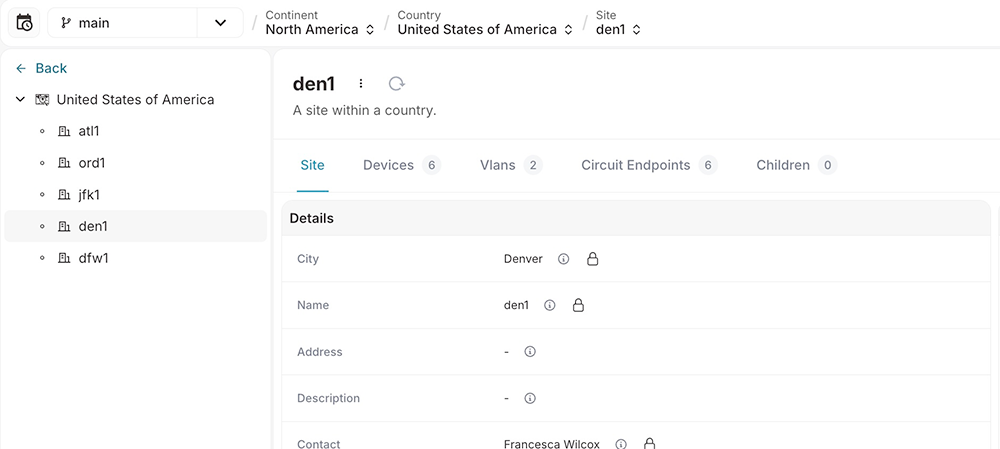
The hierarchy tree has been updated to improve both performance and usability when working with large, deeply nested structures. This is especially relevant for teams modeling physical infrastructure—such as locations, racks, and devices—or complex resource hierarchies that span thousands of objects.
These updates make it easier to move through large hierarchies while keeping interactions predictable and responsive, even as data sets grow.
Alongside this update, breadcrumb navigation has been improved to make context more visible as you move through the model. Breadcrumbs now support:
- Viewing the full parent hierarchy for the current object
- Understanding schema hierarchy for hierarchical types
- Quickly switching between related objects
Together, these changes help you stay oriented as you explore data, troubleshoot issues, or validate configurations, without losing track of where an object sits in the larger system.
More control over Git branch synchronization
Infrahub 1.6 adds support for selectively synchronizing Git branches using configurable filters. This is particularly useful if you’re working with shared or multi-purpose repositories, where only a subset of branches are relevant to infrastructure automation.
With selective synchronization, you can:
- Define branch name patterns or regular expressions
- Limit imports to production, staging, or other relevant branches
- Keep the Infrahub environment focused and easier to work with
This makes Git-backed workflows more manageable, especially in environments where repositories contain many short-lived or unrelated branches.
Explicit merge commits for clearer Git history
Infrahub can now create explicit merge commits instead of fast-forward merges, with configurable Git author details. This gives you more control over how Infrahub-driven changes appear in Git history.
For organizations that care about traceability—whether for audits, reviews, or operational clarity—explicit merge commits make it easier to see which changes came from Infrahub workflows and how they were applied over time.
Branch cleanup and reporting tool
A new infrahubctl branch report command provides a consolidated view of branch state across the system, helping you make informed decisions about branch maintenance and cleanup.
The report includes:
- Branch metadata such as creation time, sync status, and schema changes
- Detection of Git file changes
- Diff summaries showing added, updated, and removed nodes
- Proposed change details, including approval and draft status
You’ll have a clearer picture of which branches are active, which are stale, and which may be safe to remove. This can be especially useful ahead of upgrades or larger maintenance efforts.
Profiles included directly in object templates
Profiles can now be defined directly within object templates and applied automatically when objects are created. Template-defined values take precedence, and multiple Profiles can be applied with proper priority handling.
This functionality makes it easier to create objects in bulk with consistent defaults (such as compliance settings, monitoring configuration, or standard attributes) without relying on manual post-creation steps. For teams provisioning infrastructure at scale, this helps ensure new objects start in a known, consistent state.
Additional improvements
Infrahub 1.6 also includes a range of smaller improvements across performance, the UI, and Git integration, including:
- Consistent node label resolution
- Improved handling of large data sets in the hierarchy tree
- UI fixes for navigation and layout issues
- Backend reliability improvements related to database session handling
- Git configuration improvements and bug fixes
Taken together, these refinements help the platform feel more consistent and reliable during everyday use.
Get Infrahub 1.6
Infrahub 1.6 is about making the platform easier to work with as environments scale. By improving visibility, navigation, and Git workflows, this release helps infrastructure and network automation teams spend less time managing the tool itself and more time focusing on the work they’re trying to get done.
Get the full release notes, including implementation specifics, on GitHub.