

If your team has infrastructure you provision again and again—whether it’s VLANs, branch offices, full service stacks, or even entire data centers—you know the pain of manual repetition.
You build the pattern. You know exactly what needs to happen: create these objects, allocate these resources, establish these relationships, configure these settings. It’s the same steps every single time.
But you’re still doing it by hand. Or you’ve written scripts that only one person understands. Or you’re copying and pasting from the last implementation and hoping you didn’t miss anything.
Every repetition is an opportunity for inconsistency. Every manual step takes time away from more valuable work. And when the pattern changes, you have to hunt down every instance and update them individually.
Infrahub Generators solve this problem. They let you codify your repeatable infrastructure patterns once, then execute them automatically.

Infrahub Generators in a nutshell
Think of Generators as design builders. They turn repeatable design logic into live infrastructure, automatically and consistently.
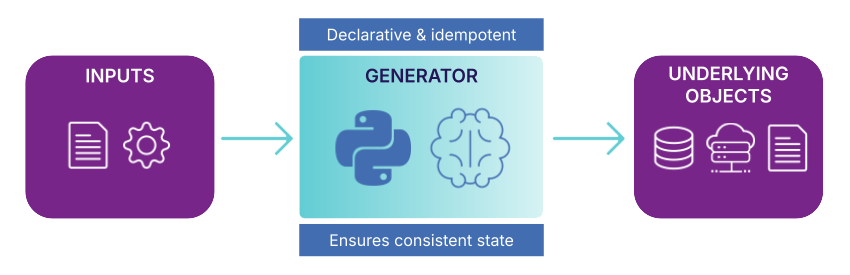
A Generator is a piece of Python code that takes a high-level service request (like “spin up a new site” or “provision dedicated internet access”) and translates that into a full technical implementation. It does this by combining your input with business logic implemented in the Python execution environment.
Generators solve a core automation challenge because they don’t just create things once. They also maintain them over time.
Generators are idempotent, which means you can run them multiple times without creating duplicates or inconsistencies. It updates existing objects as needed and removes anything that’s no longer required.
The real power comes from how Generators integrate with Infrahub’s version control system. Every object a Generator creates is tracked, versioned, and validated through CI pipelines just like any other infrastructure change. You get the automation benefits with the safety and auditability of peer-reviewed changes.
Infrahub Generator components
Generators bring together several pieces that work as a system:
- Generator definitions live in your repository and specify what your Generator does. This is where you name your Generator, connect it to your business logic, and define which objects it acts on. The definition is the configuration layer that tells Infrahub what to run and when.
- Groups define which objects trigger your Generator. When you assign objects to a Generator’s target group, those objects become inputs for automation. Groups give you precise control over what gets automated. You can have separate groups for different environments, regions, or service types.
- GraphQL queries define what data your Generator needs. Infrahub executes your query and passes the results to your Generator. This makes Generators flexible enough to work on a single object or process hundreds of objects at once.
- Business logic is where you define the rules for what gets created. This is Python code that uses Infrahub’s SDK to create objects, update relationships, and allocate resources from pools. You define your service logic once, then reuse it anywhere.
How Generators work in Infrahub
When a Generator runs, it follows a predictable pattern.
First, Infrahub looks at your target group and identifies which objects need processing. It collects the data those objects contain, such as location, bandwidth requirements, IP package sizes, or any other parameters your business logic needs.
Next, the Generator applies your business logic to that data. If you’re provisioning a service, the Generator might allocate VLANs from a pool, reserve IP addresses, configure physical ports, create gateway interfaces, and establish all the necessary relationships. If you’re deploying a new site, the Generator creates the standard set of devices, interfaces, and configurations that every site needs.
We’ve already talked about how Generators are idempotent. They remember what they created before, and when you re-run a Generator, Infrahub compares the current run against previous runs.
Objects that already exist and match the desired state aren’t touched. Objects that need updates get modified. And critically, objects that the Generator created previously but aren’t needed anymore are automatically removed.
This means Generators won’t introduce drift over time, and you can rerun them at any point to ensure your infrastructure still matches your design.
Generators can run in several ways depending on your workflow:
- Manual trigger from the UI
- Events-based trigger (when X happens, trigger Generator Y)
- Automatic trigger when the objects they target are modified
Throughout this lifecycle, every object a Generator creates or modifies is versioned and tracked. You get full audit trails showing what changed, when, who approved it, and which Generator made the change.
Common use cases for Infrahub Generators
Generators shine in scenarios where you have repeatable infrastructure patterns:
- Service provisioning: You create a service object with high-level parameters (bandwidth, location, IP package size). The Generator then allocates VLANs, reserves IP addresses from pools, configures physical ports, creates gateway interfaces, and establishes all the relationships needed for a complete service implementation.
- New site deployment: When you add a site to your infrastructure, a Generator can automatically create the standard set of devices, interfaces, IP allocations, and configuration templates that every site needs. You define the pattern once, and the Generator applies it consistently across every location.
- Resource allocation at scale: When you need to assign IP addresses, VLAN IDs, or AS numbers to dozens of objects, a Generator can pull from resource pools and assign values according to your business rules, ensuring no conflicts or duplicates.
- Maintaining derived objects: Some objects exist purely because other objects exist (think configuration snippets derived from device data, or monitoring targets generated from service definitions). Generators can keep these derived objects in sync automatically as source data changes.
- Generating data center fabric: Define a data center topology and a Generator can create all the necessary infrastructure objects (spine switches, leaf switches, cabling, BGP sessions) based on your design templates and scale requirements.
- Enabling an IT service catalog: You can layer a UI on top of a Generator, like a form built in Streamlit, to let users spin up or change infrastructure without touching the low-level implementation.
Infrahub Generators FAQs
What’s the difference between a Generator and a Transformation?
Use Generators when you need to populate or maintain your infrastructure data model. Use Transformations when you need to produce configuration files, deployment manifests, or other text-based outputs from that data.
Do I need to know Python to use Generators?
Can Generators update existing objects or only create new ones?
How do Generators integrate with resource pools?

Ready to try Infrahub Generators?
- Play with the self-serve demos: You’ll find production-quality examples of Generators in our service catalog demo repository and data center bundle.
- Explore the technical details: The Generator implementation guide walks you through creating, testing, and deploying Generators step-by-step.
- Request a personalized Infrahub demo to see how Generators can eliminate repetitive tasks while ensuring consistency across your infrastructure.